Your Spark Job Is Lying to You: What Actually Happens After You Hit Run?
You wrote five lines of PySpark. Spark built a distributed execution plan, moved data across the network, scheduled tasks, managed memory, and possibly spilled data to disk. And you thought you were just joining two DataFrames. Let's talk about what actually happens. Here's a situation most data engineers have experienced. You write a PySpark transformation. It looks clean. The logic is correct. You run a quick .show(), and the result appears almost instantly. You feel good. Then you submit the production job. Five minutes pass. Then fifteen. The Spark UI shows several completed stages, one stage that refuses to finish, and a few executors that seem to be having a very bad day. Someone suggests increasing the number of executors. Someone else suggests increasing spark.sql.shuffle.partitions. A third person says, "Let's cache it." Suddenly, we're holding a committee meeting about a DataFrame. But here's the question I'd ask before changing a single configuration: Do we actually understand what Spark is doing with this job? Because writing Spark code and understanding Spark execution are two very different skills. And at Staff Engineer level, that difference matters. I've always found that many performance problems become easier to reason about once you stop looking at Spark as a Python library and start looking at it as a distributed execution engine. So let's follow a Spark job from the moment we write the code to the moment the output lands in storage. No magic. No configuration superstition. Just what happens under the hood.
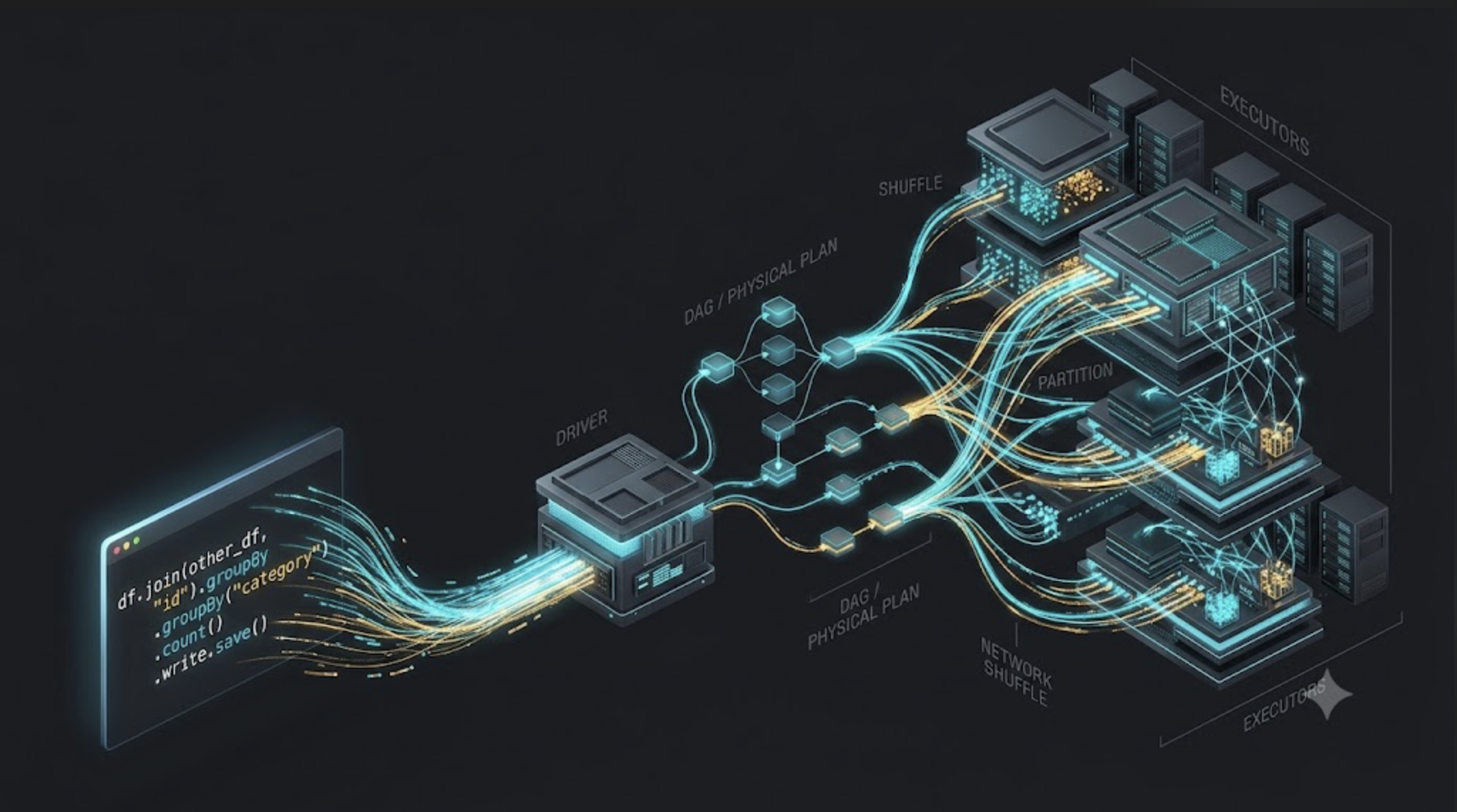
1. The first misconception: Your code doesn't run when you write it
Consider this familiar example.
from pyspark.sql import functions as F

transactions = spark.table("gold.transactions")

filtered_transactions = (
    transactions
    .filter(F.col("amount") > 100)
    .select(
        "transaction_id",
        "account_id",
        "amount"
    )
)

account_summary = (
    filtered_transactions
    .groupBy("account_id")
    .agg(
        F.sum("amount").alias("total_amount")
    )
)
How many times has Spark necessarily executed the underlying distributed computation at this point?
Zero.
Assuming these are ordinary Spark DataFrame operations and no action has been triggered, Spark has primarily been building a description of the computation.
It knows what you want to do. It hasn't necessarily processed all those records yet.
This is called lazy evaluation.
Transformations such as filter, select, groupBy, and agg describe operations that Spark can plan and execute later.
An action such as count(), collect(), show(), or writing the result generally triggers execution of the computation needed to produce that result.
There are nuances: some APIs and operations can perform eager work or trigger additional jobs, and Spark may read metadata before the final action. But the fundamental DataFrame model is lazy.
Why does Spark work this way?
Imagine you filtered a dataset, selected a few columns, and then aggregated it.
If Spark executed every transformation independently and materialized every intermediate result by default, it could perform unnecessary work.
By delaying execution, Spark has an opportunity to optimize the overall plan.
For example, it may push filters closer to the data source, eliminate unused columns, or combine compatible operations.
That's a much better approach than blindly executing every instruction exactly as it appears in your Python file.
The engineering lesson: Spark optimizes a computation, not just individual lines of code.
And that brings us to the next question.
If Spark hasn't executed our code yet, what has it been doing?
2. The architecture: From your code to distributed execution
This is the mental model I want every senior data engineer to carry into an interview.
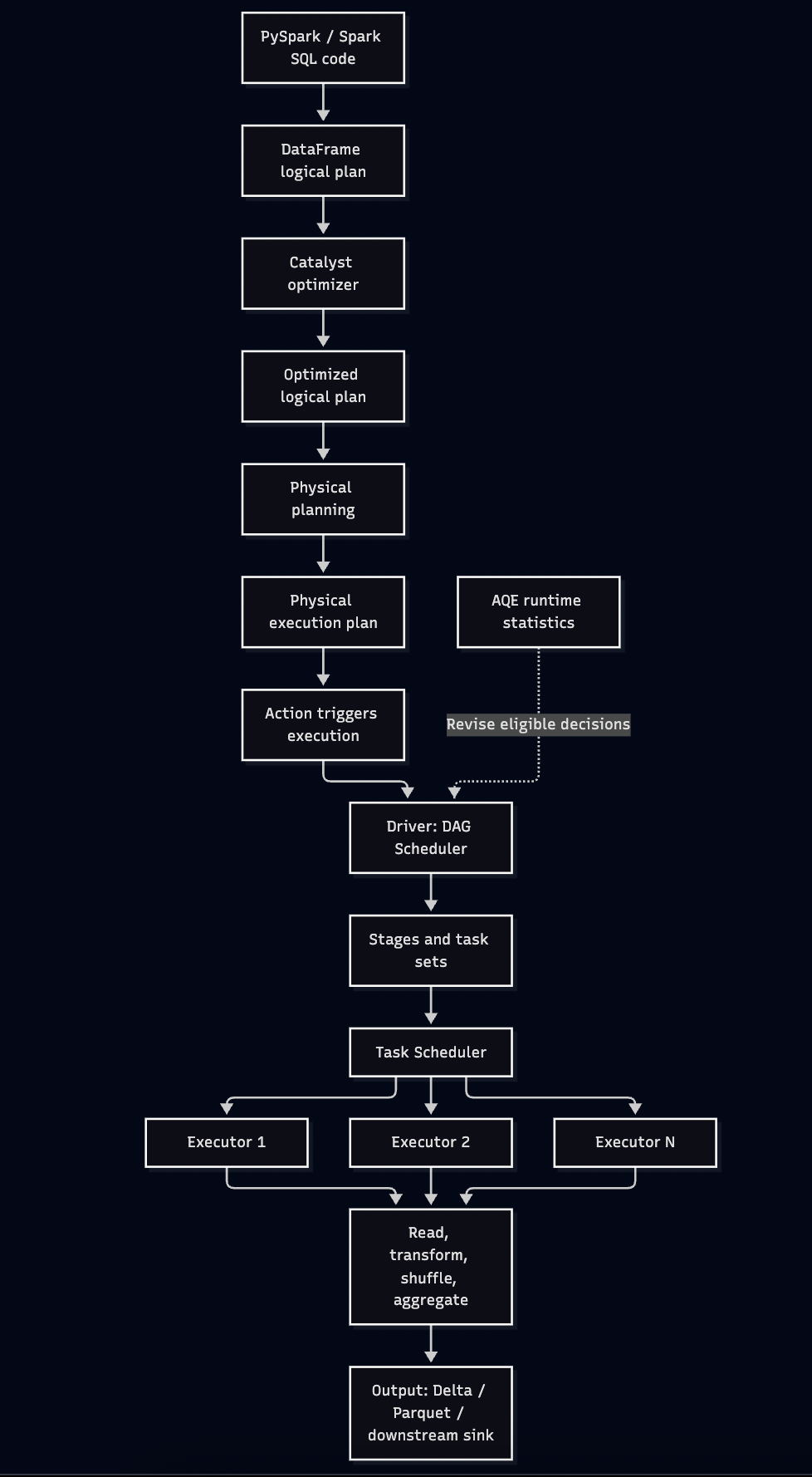
Figure 1: A simplified Spark SQL execution path. The driver coordinates execution, executors process partitions, and AQE can revise eligible physical execution decisions using runtime statistics.
Let's unpack the important pieces.
The Driver
The driver is the coordinating process for a Spark application.
It maintains the Spark session and coordinates planning and execution, including task scheduling and tracking job progress.
In Spark SQL, the driver-side planning process also determines the execution plan before the relevant work is scheduled.
If the driver fails, the application generally cannot continue as though nothing happened. Driver availability and recovery behavior therefore matter operationally.
The Executors
Executors are processes that run tasks and maintain application-related resources, including cached data and execution memory.
They perform much of the distributed work: scanning input partitions, applying transformations, joining records, aggregating data, and writing output.
The driver coordinates. The executors do the distributed processing.
That distinction matters because a slow job is not automatically a driver problem, and an executor problem is not automatically a shortage of executors.
The Cluster Manager
In a cluster deployment, a cluster manager allocates resources for the application. Depending on the environment, this might be Spark's standalone cluster manager, YARN, or Kubernetes.
On managed platforms, some of these responsibilities are abstracted away.
But the underlying questions remain:
How much compute is available?
How many tasks can execute concurrently?
Are resources being used effectively?
Is the bottleneck CPU, memory, network, storage, or something else?
These are architecture questions, not just Spark configuration questions.
3. Catalyst: The optimizer that doesn't care how pretty your code looks
Spark SQL uses the Catalyst optimizer to analyze and optimize structured queries.
This is one of the most important pieces of Spark internals to understand because it explains why the code you write does not necessarily correspond one-to-one with the operations that execute.
Consider this:
df = (
    spark.table("silver.transactions")
    .filter("amount > 100")
    .select("account_id", "amount")
)
If the source supports predicate and column pushdown, Spark may be able to apply the filter and read only the required columns closer to the data source.
The exact behavior depends on the source, its capabilities, the query, and the physical plan.
The important point is that Spark has optimization opportunities because it understands the structure of the computation.
The major stages of query planning
At a high level, Spark SQL:
Builds a logical representation of the query.
Analyzes that representation, resolving table names, columns, types, and functions.
Applies logical optimization rules.
Generates candidate physical plans and selects a plan based on applicable rules and available statistics.
Executes the selected physical plan when the required action runs.
The exact internals are more detailed than this simplified sequence, but it is a useful interview-level model.
Why should a Staff Engineer care?
Because poor performance may originate before the first task begins.
Imagine a query reads an entire table when it only needs the current month's data.
You might spend hours tuning executors when the bigger opportunity is partition pruning.
Or suppose the query joins two tables with a bad cardinality estimate. The optimizer may choose a strategy that becomes expensive at runtime.
More compute cannot reliably compensate for every bad planning decision.
This is why I prefer to inspect the plan before tuning the cluster.
df.explain(mode="extended")
For a more execution-oriented view:
df.explain(mode="formatted")
For supported Spark SQL queries, you can also inspect estimated costs:
EXPLAIN COST
SELECT account_id, SUM(amount)
FROM gold.transactions
GROUP BY account_id;
The exact level of detail available depends on the Spark version, source, catalog, and statistics.
Staff Engineer takeaway: Understand what Spark planned before deciding what the cluster needs.
4. The DAG: Spark's map of the work
DAG stands for Directed Acyclic Graph.
In Spark, the term is useful at two related levels: the dependency graph of an application and the execution stages represented by the scheduler.
At a high level, Spark represents dependencies between operations and uses them to determine what work can be performed and what must wait for upstream results.
Consider this example:
transactions = spark.table("gold.transactions")

filtered = transactions.filter("amount > 100")

selected = filtered.select(
    "account_id",
    "amount"
)

summary = selected.groupBy("account_id").sum("amount")

summary.write.mode("overwrite").parquet(output_path)
The code is sequential in appearance, but Spark does not necessarily execute every transformation as a separate physical job or stage.
It can optimize compatible operations and organize the computation into stages according to execution dependencies.
The write is an action that triggers the work needed to produce the output.
Why does the DAG matter?
Because it helps Spark determine:
Which operations depend on other operations.
Which tasks can execute in parallel.
Where a stage must wait for upstream output.
Where shuffle dependencies require additional coordination.
How failed tasks and stages can be retried.
The DAG is not just a pretty diagram in the Spark UI.
It is part of how Spark organizes distributed execution.
And now we reach one of the most misunderstood concepts in Spark interviews.
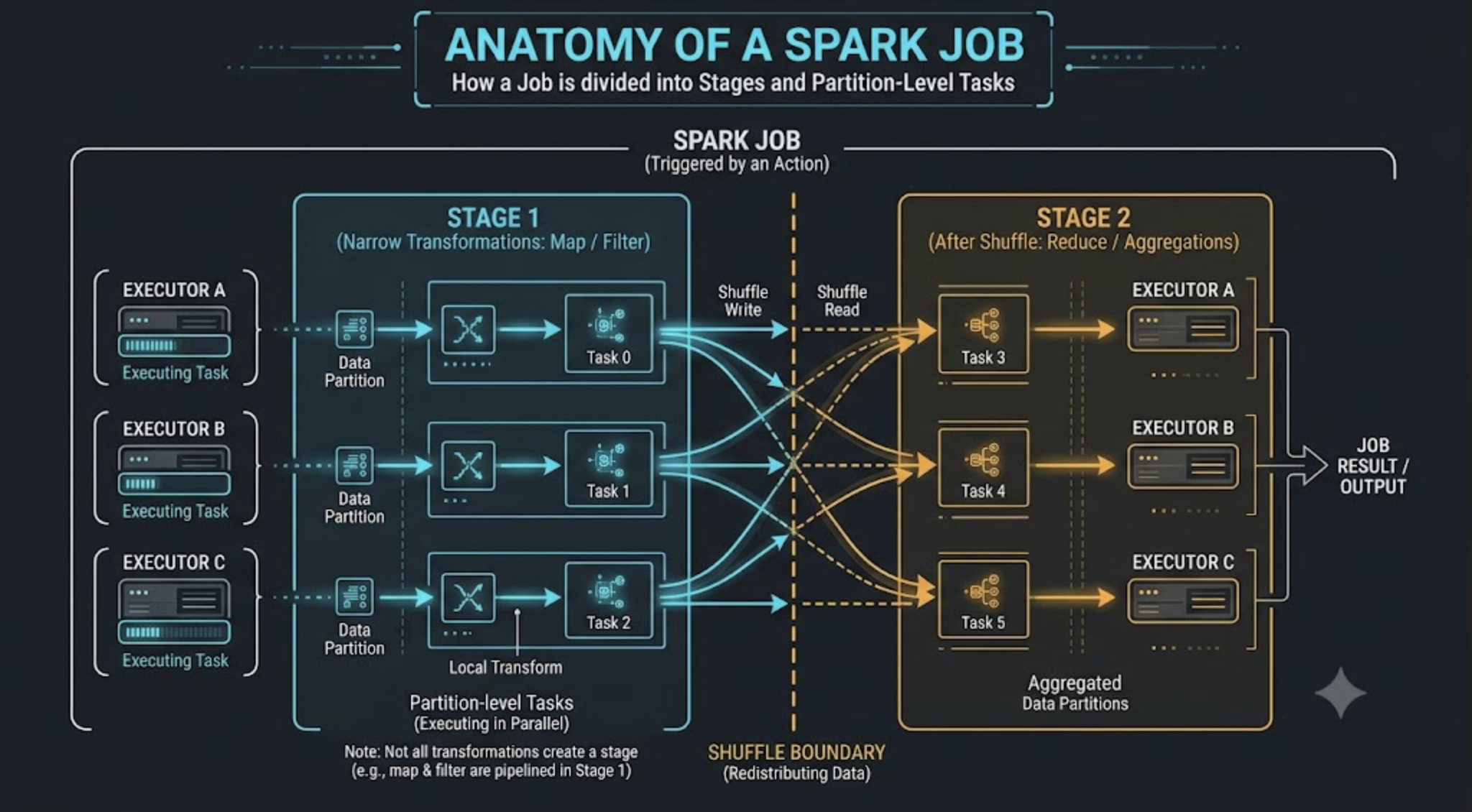
5. Jobs, stages, and tasks: Three words people keep mixing up
Let's settle this once and for all.
A job is a unit of computation triggered by an action or another execution request.
A stage is a group of tasks that can be scheduled together around compatible execution dependencies.
A task is the unit of work sent to an executor, commonly processing one partition of the relevant input for that stage.
A single Spark application can contain multiple jobs. A job can contain multiple stages. A stage typically contains multiple tasks.
That is the useful mental model.
Example: A simple aggregation
df = spark.read.parquet(input_path)

result = (
    df.filter("amount > 100")
      .groupBy("account_id")
      .sum("amount")
)

result.write.parquet(output_path)
Conceptually, Spark needs to read the relevant records, filter them, aggregate them by account, and write the result.
The physical plan might use partial aggregation before a shuffle, followed by a final aggregation.
The shuffle introduces a dependency between work performed before and after the exchange.
This can produce multiple stages.
The exact number of stages depends on the optimized physical plan and execution behavior, so never assume every DataFrame transformation creates a stage.
How many tasks will Spark run?
Task count is tied to the relevant stage's partitions and execution plan, not simply to the number of lines of code.
If a stage processes 200 partitions, it may have approximately 200 tasks for that stage.
But that does not mean 200 tasks run simultaneously.
Concurrent execution depends on available task slots, executor resources, scheduling constraints, and other workload activity.
The interview distinction
If an interviewer asks, "What is the difference between a stage and a task?" don't stop at definitions.
Explain that stages represent execution dependencies, while tasks perform partition-level work within a stage. Then connect the distinction to parallelism and shuffle boundaries.
That demonstrates understanding of how the concepts affect real execution.
6. Shuffle: The moment your data starts travelling
If I had to pick one Spark concept every performance-focused data engineer should understand deeply, it would be shuffle.
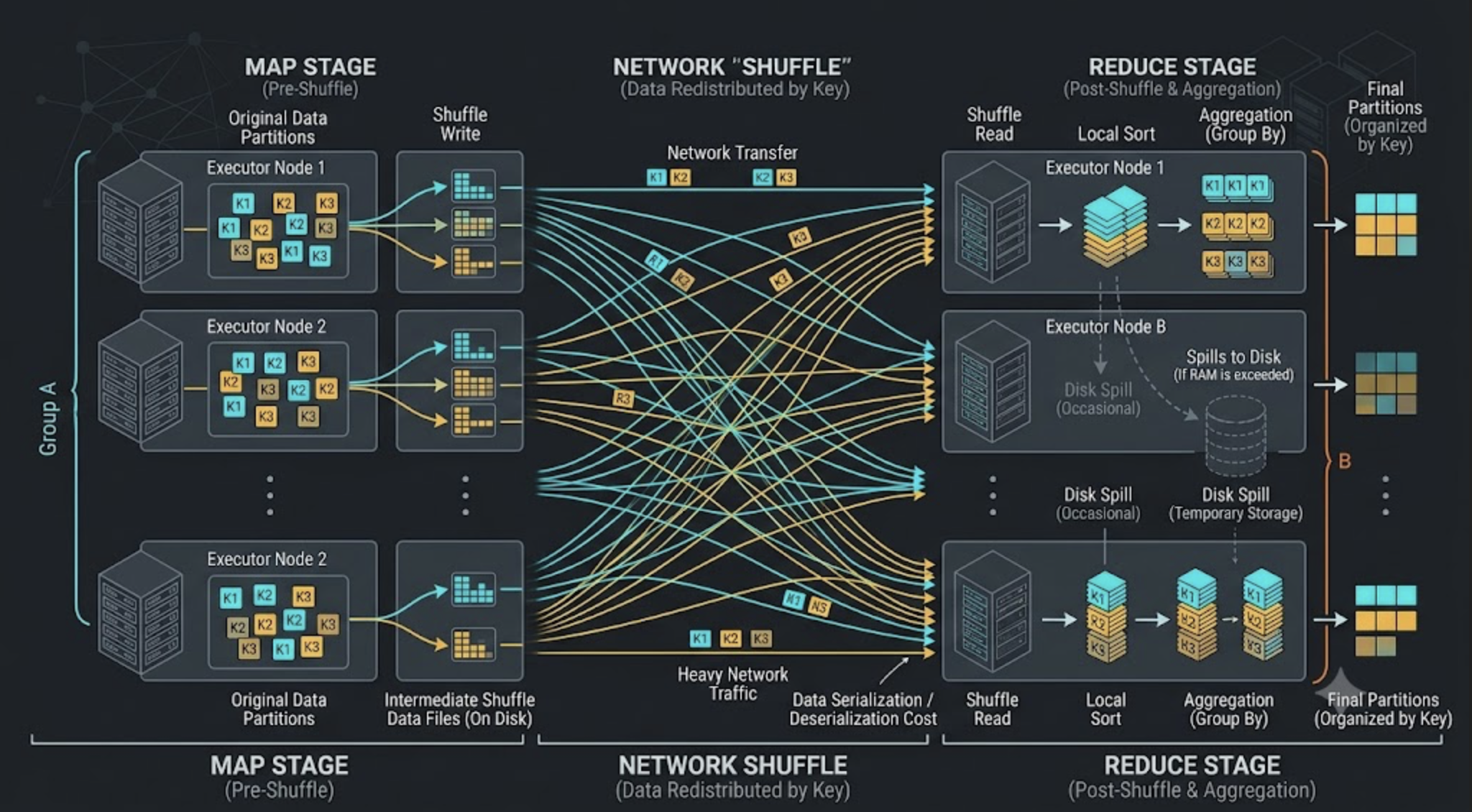
A shuffle redistributes data across partitions, commonly across executors, so downstream operations can work with the required data distribution.
It often involves network transfer, serialization, buffering, disk I/O, and coordination between stages.
And all of that costs time and resources.
Example: Grouping by account
result = (
    transactions
    .groupBy("account_id")
    .sum("amount")
)
To compute the final sum for an account, Spark must combine the contributions from records belonging to that account.
A typical physical plan may perform partial aggregation locally, shuffle intermediate results by account key, and then perform final aggregation.
The partial aggregation can reduce shuffle volume substantially, but the amount of reduction depends on the data and the operation.
Why shuffle creates stage boundaries
Shuffle dependencies require downstream tasks to consume output produced by upstream tasks.
Spark therefore needs to coordinate the production and availability of shuffle data before dependent downstream work can proceed.
This is why shuffle operations often separate stages in the execution DAG.
A narrow transformation, such as a simple filter, can usually process each partition independently without redistributing records across the cluster.
A wide transformation, such as a typical groupBy or repartitioning operation, may require redistribution.
This distinction is fundamental.
Why shuffle is expensive
Network: Data may move between executors.
Disk: Shuffle data can be written to and read from local storage.
Serialization: Records must be represented for transfer and processing.
Memory: Buffers and intermediate structures consume execution memory.
Coordination: Downstream tasks depend on upstream shuffle output.
A shuffle is not inherently bad. Many distributed computations require it.
The engineering question is whether the shuffle is necessary, whether it moves more data than needed, and whether the data is distributed well.
What I'd investigate in production
When a stage is unexpectedly slow, I would check shuffle read and write metrics, task-duration distribution, spill, and input records in the Spark UI.
If a query shuffles hundreds of gigabytes, I want to understand why.
Can we filter earlier? Project fewer columns? Reduce intermediate data with partial aggregation? Avoid an unnecessary repartition? Reuse an appropriate existing layout?
These are more useful questions than blindly increasing the shuffle partition count.
7. Why adding executors sometimes makes absolutely no difference
Let's say a stage has 100 tasks.
Your cluster can run 20 tasks concurrently, so Spark executes the workload in several waves.
You add more executors, increasing capacity to 40 concurrent tasks.
If the work is reasonably balanced and the cluster was resource-constrained, this could improve execution time.
But now consider a different workload.
Ninety-nine tasks finish in 20 seconds. One task takes 12 minutes because a single account ID contains an enormous fraction of the records.
Adding executors does not automatically split that one task into smaller pieces.
The job can still wait for the straggler.
This is a simplified example of data skew, and it explains why resource scaling is not a universal performance solution.
Other reasons additional executors might not help include:
The workload is bottlenecked by a single partition or stage dependency.
The input source cannot deliver data any faster.
The job is constrained by storage or network throughput.
Tasks spend significant time spilling or processing oversized partitions.
There is insufficient parallelizable work.
Resource allocation or scheduling limits prevent the expected concurrency.
The correct response is to diagnose the bottleneck first.
At Staff Engineer level, I would expect an engineer to explain not just how to add compute, but why additional compute should improve the specific workload.
8. Adaptive Query Execution: Spark can change its mind
Traditional query planning relies on information available during planning, including statistics and estimates.
But runtime data can reveal things that estimates missed.
A relation may be much smaller after filtering than expected. Shuffle partitions may turn out to be too small. A few partitions may be much larger than the others.
Adaptive Query Execution, or AQE, allows Spark SQL to revise eligible parts of its physical execution plan using runtime statistics.
Important capabilities include:
Coalescing small shuffle partitions.
Optimizing certain skewed shuffle partitions.
Converting eligible sort-merge joins into broadcast hash joins when runtime information supports the conversion.
This is especially relevant when the actual size or distribution of data differs from the initial estimate.
Example: Check the setting
spark.conf.get("spark.sql.adaptive.enabled")
In standard Spark SQL configurations, AQE is enabled by default in Spark 3.2 and later, although platform configurations and application settings may differ.
Always check the effective setting in your environment.
The catch
AQE is not an all-purpose optimizer that guarantees every query will become fast.
It can make specific adaptive decisions when the required conditions are met. It cannot automatically fix every poor join condition, eliminate all data skew, or compensate for an unnecessarily large computation.
The Staff Engineer view: AQE is a powerful optimization mechanism, but you still need to understand the original plan, runtime evidence, and final execution behavior.
9. Caching: Useful tool or expensive superstition?
Caching is one of those topics where a little knowledge can create a surprising amount of unnecessary work.
Consider:
df.cache()

df.count()

df.groupBy("account_id").sum("amount").show()
The cache() call requests persistence using the default storage level for the DataFrame API in the relevant Spark version. It does not mean every row is instantly materialized in memory.
The subsequent count() triggers computation and can populate the cache as partitions are processed.
Later operations may reuse the cached data if it remains available and the plan can use it.
But is caching always beneficial?
No.
Caching can help when an expensive intermediate dataset is reused multiple times. It can hurt when the dataset is used only once, is too large to retain efficiently, competes with execution memory, or creates unnecessary materialization work.
There is also an important operational detail: cached data can be evicted or lost, and Spark may recompute partitions when needed.
Caching is not a permanent storage guarantee.
What I ask before caching
Is this intermediate dataset reused?
How expensive is it to recompute?
How large is it after filtering and projection?
Is there sufficient memory and storage capacity?
Does caching improve the total workflow, not just one action?
If the answer is that a dataset is used only once, I would need a specific reason to persist it.
Otherwise, we may simply be paying to compute, store, and manage data that could have flowed through the pipeline once.
10. The Spark UI: Your job's medical report
If Spark code is the prescription, the Spark UI is where I look for evidence that the treatment is working.
When a production job runs slowly, I don't begin by changing five configurations and hoping the problem disappears.
I start with the actual execution.
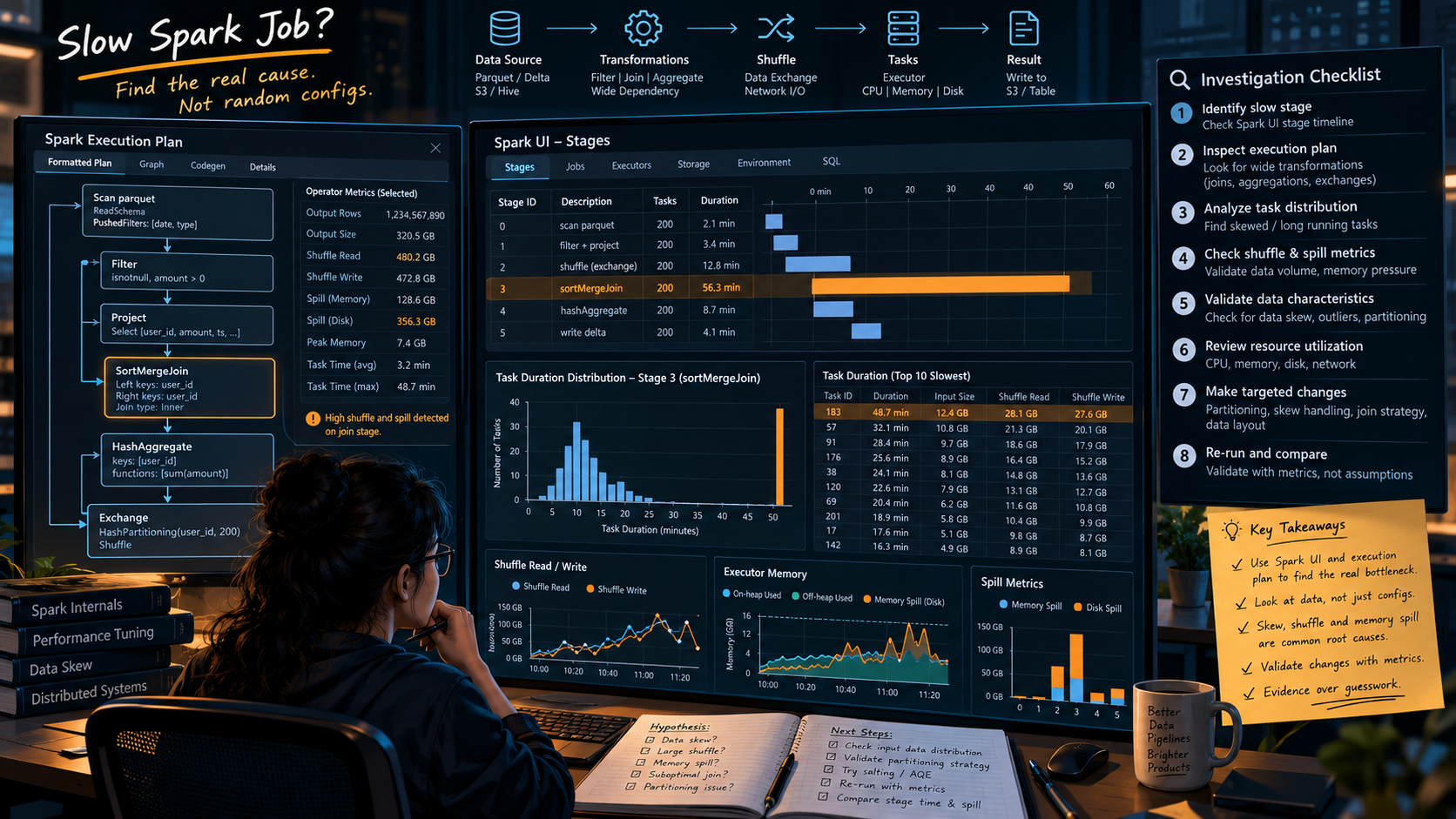
My debugging sequence
Step 1: Inspect the SQL execution plan.
Look for unexpected scans, exchanges, sorts, join operators, and expensive aggregations.
Step 2: Find the slow stage.
Identify which stage dominates total runtime. The longest stage is often a useful starting point, but also consider dependencies and stages that run sequentially.
Step 3: Compare tasks within that stage.
Are durations similar, or do a few tasks take dramatically longer?
Step 4: Inspect shuffle and spill metrics.
High shuffle volume, disk spill, or substantial task-level variation can point toward data movement, memory pressure, or skew.
Step 5: Check resource utilization.
Are executors CPU-bound, waiting on I/O, experiencing memory pressure, or underutilized?
Step 6: Form a hypothesis and test it.
If the evidence points to skew, investigate the key distribution. If the issue is unnecessary shuffle, review the plan and data layout. If the workload is CPU-bound and balanced, compute sizing might be appropriate.
Change one important variable at a time where possible, and compare equivalent runs.
The goal is to know why the change helped, not just to see a shorter runtime.
11. A complete debugging example: From slow job to an engineering decision
Imagine a daily account-level aggregation is taking 45 minutes instead of the expected 10.
The code is straightforward:
daily_summary = (
    spark.table("gold.transactions")
    .filter("transaction_date = '2026-10-15'")
    .groupBy("account_id")
    .sum("amount")
)

daily_summary.write.mode("overwrite").parquet(output_path)
Those runtimes are illustrative, not measured results.
How would I investigate?
Hypothesis A: Too much data is being scanned
Check the source layout and physical plan.
If the table is partitioned by transaction date, verify that the predicate enables partition pruning. If it is not partitioned that way, don't assume the filter eliminates the cost of scanning unrelated files.
Hypothesis B: Shuffle volume is too high
Inspect the aggregation plan and shuffle metrics.
Spark may already be performing partial aggregation, reducing records before the shuffle. If the operation produces many intermediate records, understand why before trying to force a different execution strategy.
Hypothesis C: A few accounts dominate the workload
Compare task-level input, shuffle, and duration metrics. Inspect account-key frequencies.
If one account has a disproportionate volume of records, evaluate whether skew optimization or a carefully designed alternative can improve distribution without changing aggregation semantics.
Hypothesis D: The cluster is genuinely undersized
If the work is well distributed, executors are consistently resource-constrained, and the workload has enough parallelism, increasing available compute could help.
This is where scaling becomes an evidence-backed decision rather than a reflex.
The Staff Engineer lesson
The code itself doesn't tell us which hypothesis is correct.
We need the plan, runtime metrics, and data distribution.
A strong engineer narrows the problem using evidence. A strong Staff Engineer also makes sure that this reasoning becomes repeatable through monitoring, runbooks, performance baselines, and team practices.
12. What interviewers really want to hear
Memorizing definitions can get you through the first few minutes of an interview.
Explaining the consequences of those definitions is what makes your answer stronger.
Here are the questions I would practice.
Q1. What happens when you call an action on a Spark DataFrame?
An action triggers the computation required to produce the requested result. Spark SQL analyzes and optimizes the logical plan, selects a physical plan, and the driver coordinates execution through jobs, stages, and tasks. Executors process the distributed partitions.
Q2. What is the difference between a job, stage, and task?
A job is a unit of computation triggered by an action or execution request. A stage is a group of tasks organized around compatible execution dependencies. A task is a unit of work, typically operating on one partition for that stage.
Q3. Why is shuffle expensive?
Shuffle redistributes data between partitions and can involve network transfer, serialization, disk I/O, memory buffers, and coordination between stages. Its cost depends on data volume, partitioning, execution resources, and the surrounding plan.
Q4. What is the difference between narrow and wide transformations?
Narrow transformations can generally process each output partition using a limited number of corresponding input partitions without a full redistribution, while wide transformations require data from multiple input partitions to be redistributed or combined. Typical filters are narrow; grouping by a key commonly introduces a shuffle.
Q5. Why can adding executors fail to improve performance?
The bottleneck may be skew, a single oversized partition, a sequential stage dependency, storage throughput, network traffic, or a workload with insufficient parallelism. Additional compute only helps when it addresses the actual constraint.
Q6. What does Catalyst do?
Catalyst analyzes and optimizes Spark SQL queries and participates in physical-plan selection. It enables optimizations such as predicate pushdown where supported, column pruning, and other logical and physical planning improvements.
Q7. What does AQE do?
AQE uses runtime statistics to revise eligible execution decisions, including coalescing shuffle partitions, optimizing certain skewed partitions, and converting eligible join strategies.
Q8. When should you cache a DataFrame?
When an expensive intermediate dataset is reused and persisting it improves overall execution. The decision should account for dataset size, recomputation cost, memory pressure, cache reuse, and materialization overhead.
Q9. How do you investigate a slow Spark job?
Inspect the physical plan, identify expensive stages, compare task durations, analyze shuffle and spill, check resource utilization, and validate key distribution. Then change the part of the system supported by the evidence.
Q10. What makes this a Staff Engineer problem rather than just a Spark tuning problem?
The Staff Engineer must connect execution behavior to system design, reliability, cost, workload growth, and team practices. The objective is not only to fix one slow job, but to make the platform more predictable and the diagnosis repeatable.
13. What I would expect from a Staff Engineer beyond the Spark UI
Knowing the internals is necessary. Knowing when to apply that knowledge is what makes it valuable.
At Staff level, I would focus on five dimensions.
1. Predictability
Can we estimate how a workload behaves as data volumes grow? Are there performance baselines and alerts for regressions?
2. Reliability
Do skew, memory pressure, executor failures, or data-source bottlenecks regularly cause missed SLAs? Do we have clear diagnostic procedures?
3. Cost efficiency
Are we reducing unnecessary scans, exchanges, recomputation, and wasted compute? Are we measuring cost alongside runtime?
4. Architectural fit
Does the workload belong on Spark? Is the storage layout suitable? Are the latency requirements compatible with batch processing, micro-batching, or streaming?
5. Engineering leverage
Can the team recognize and diagnose recurring problems without requiring one expert to intervene every time?
That last point is easy to underestimate.
If only one engineer knows why the largest job in the platform fails, the organization has a knowledge bottleneck.
A Staff Engineer should help turn that knowledge into observability, documentation, design standards, and better engineering decisions across the team.
The objective is not to become the only person who can fix Spark.
It is to make the entire team better at understanding distributed systems.
14. The final mental model
If you remember only one sequence from this article, remember this:
Code → Logical Plan → Optimized Plan → Physical Plan → Jobs → Stages → Tasks → Executors → Output
Then remember the two questions behind that sequence:
What work is Spark planning to do?
What is the runtime evidence telling us about the work it actually performs?
Those questions will help you answer far more than one Spark interview question. They provide a foundation for understanding joins, aggregations, data skew, caching, shuffle optimization, and execution failures.
And they give you a much better starting point than randomly adjusting cluster configurations.
Here's the uncomfortable truth about distributed computing:
If you don't understand how your work is distributed, adding more machines is just a very expensive way to stay confused.A strong data engineer writes correct code.
A great data engineer understands how that code executes.
And a Staff Engineer makes sure the system, the team, and the architecture remain understandable when the data grows tenfold.
Now, that's the kind of Spark knowledge worth taking into an interview.
#ApacheSpark #SparkSQL #DataEngineering #BigData #DistributedSystems #StaffEngineer #DataArchitecture #InterviewPreparation
About the author
- I am a Lead Data Infrastructure Architect with 13+ years of experience engineering high-throughput data platforms for fintech and consumer apps. I specialize in the Databricks Lakehouse ecosystem, PySpark, BigQuery, and Snowflake. I write about modern data architecture, cloud cost optimization (FinOps), declarative ELT pipelines, and scaling systems to process 100K+ events per second. When I'm not untangling complex legacy databases, I'm building zero-loss data quality frameworks.
Comments
Join the discussionNo comments yet. Be the first to comment.